

Connect with the
Participants Directory
Connect with
the Participants
Directory
Make the Right Connections, Faster.
Participants Directory user guide
01. Access MIPCOM's Participants Directory

• Log into the Participants Platform (Login button in the header of the website).
• Click on the Showplanner/heart icon and choose Participants.
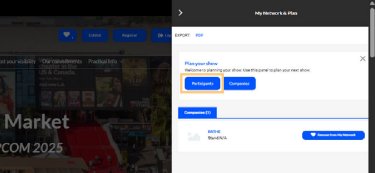
Click on the Participants tab to see MIPCOM Participants Directory.
02. Navigate Participants Directory
1. Filters
Filter participants by:
• Buyers/visitors status
• Job function
• Content genre of expertise
• Countries
2. Search
• Job Title
• First and last
• names
• Company name
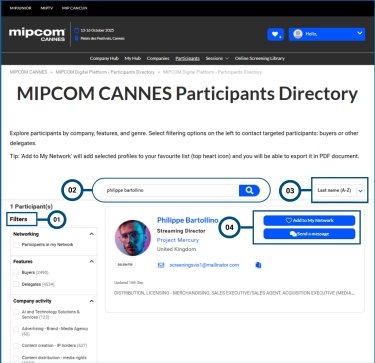
3. Sort by
• A-Z
• Z-A
• Newest
4. Network & Message
Network - Option to “Add to My Network” (favourites). Can download your favourites in PDF!
Message - Participants can initiate connections by sending direct messages to one another.
03. More Features Of Participants Directory
5. Participants Details
Participants details are displayed on the website to provide insights and foster familiarity.
6. Categories
Participants can view the categories of other participants to identify shared or related interests.
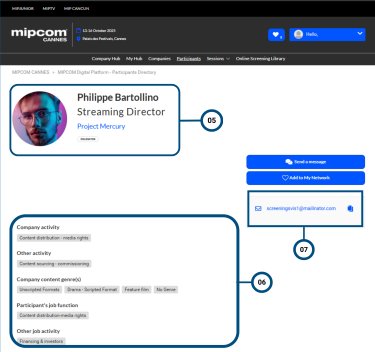
7. Email
Participants also have the option to contact others via email.
Ready to connect? Log in to your MIPCOM account and explore the Participants Directory to ignite new partnerships and opportunities!
Already registered? Login below
Not yet registered? Register below